
Nausea from phone use isn’t just limited to scrolling, it can also occur during sustained screen viewing. While it’s often explained as a sensory conflict between your eyes and inner ear (where your eyes detect motion or visual demand while your body remains still), it’s also closely tied to strain on the accommodative and binocular vision systems. When these systems are overworked or not functioning efficiently, they can fall out of sync with the vestibular (balance) system, increasing the likelihood of symptoms like nausea, dizziness, and discomfort. This is why conditions such as binocular vision dysfunction (BVD) can play a significant role, and why simple self-checks, like pattern glare tests, can be helpful indicators of underlying visual stress.
You’re lying on the couch, scrolling through your feed, and within minutes a wave of queasiness hits. No spinning room, no flu symptoms, just that unmistakable sick feeling that vanishes the moment you put your phone down. If this sounds familiar, you’re not imagining it, and you’re far from alone. What you’re experiencing has a name, a clear cause, and real solutions.
Key Takeaways
- Cybersickness is caused by a mismatch between visual motion and physical stillness, confusing your brain’s balance system.
- People with underlying visual processing issues are significantly more prone to screen-related nausea.
- Scrolling speed, screen brightness, and viewing angle all influence symptom severity.
- Simple behavioral adjustments can reduce symptoms quickly, but recurring nausea may signal a deeper vision problem worth evaluating.
- Conditions like binocular vision dysfunction are frequently linked to digital motion sickness.
- Vision therapy and neuro-optometric assessment can address the root cause, not just the symptoms.

What Actually Happens in Your Brain When You Scroll
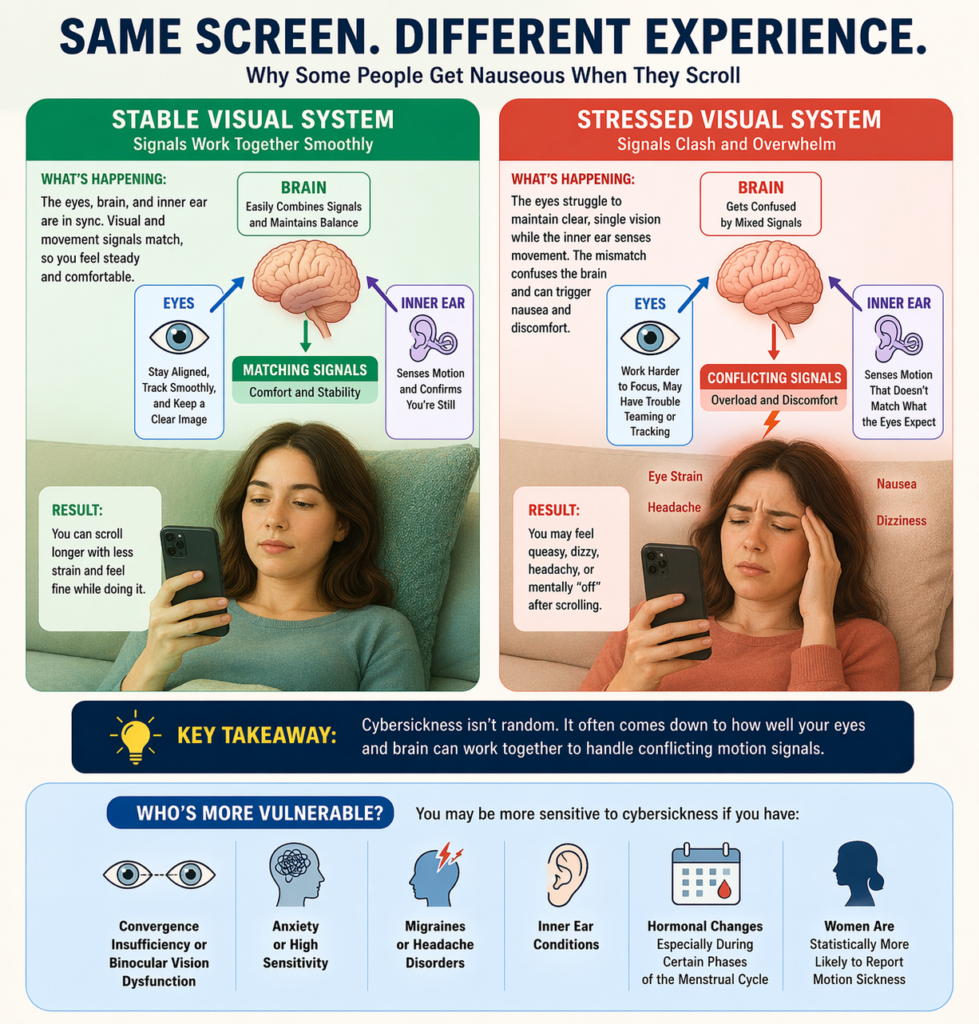
Your brain is constantly cross-referencing two streams of information: what your eyes see and what your vestibular system (the balance mechanism in your inner ear) feels. When these two signals agree, everything is fine. When they conflict, your brain interprets it as a potential threat.
Scrolling creates a specific kind of conflict. Your eyes are tracking fluid movement across the screen — text, images, and video rushing past — while your body is completely still. Your inner ear reports no motion. Your eyes report constant movement. The brain, unable to reconcile this, triggers a nausea response as a protective reflex.
This phenomenon is classified under the broader umbrella of visually induced motion sickness (VIMS). Research suggests that roughly 15–25% of the general population experiences notable cybersickness symptoms during screen use, with rates climbing significantly among people with pre-existing visual processing difficulties.
Why Are Some People More Sensitive Than Others?
Not everyone who scrolls gets nauseous, which raises the obvious question: what makes certain people more vulnerable? The answer usually comes down to how efficiently their visual system processes conflicting motion signals.
People with strong visual-vestibular integration tolerate the mismatch more easily. Those with subtle visual processing weaknesses, including issues with eye teaming, convergence, or tracking, have a harder time. Their brains are already working harder to maintain stable, clear vision. Add a moving screen into the mix, and the system becomes overwhelmed faster.
Studies in neuro-optometry indicate that individuals with convergence insufficiency or binocular vision dysfunction report cybersickness symptoms at rates two to three times higher than the general population. These conditions interfere with the brain’s ability to align and stabilize images during motion, making screen use significantly more taxing on the visual system.
Other factors that increase sensitivity include anxiety disorders, migraines, inner ear conditions, and hormonal changes. Women, particularly during certain phases of the menstrual cycle, tend to report higher rates of motion sickness overall, including cybersickness.
The Role of Screen Behavior and Environment
How and where you scroll matters as much as your underlying visual health. Certain habits dramatically amplify the sensory conflict your brain is trying to manage.
| Trigger Factor | Why It Makes Symptoms Worse | Better Alternative |
| Scrolling while lying down | Gravity shifts vestibular signals unexpectedly | Sit upright with head level |
| High scroll speed or autoplay video | Increases visual motion conflict intensity | Slow down, pause between sections |
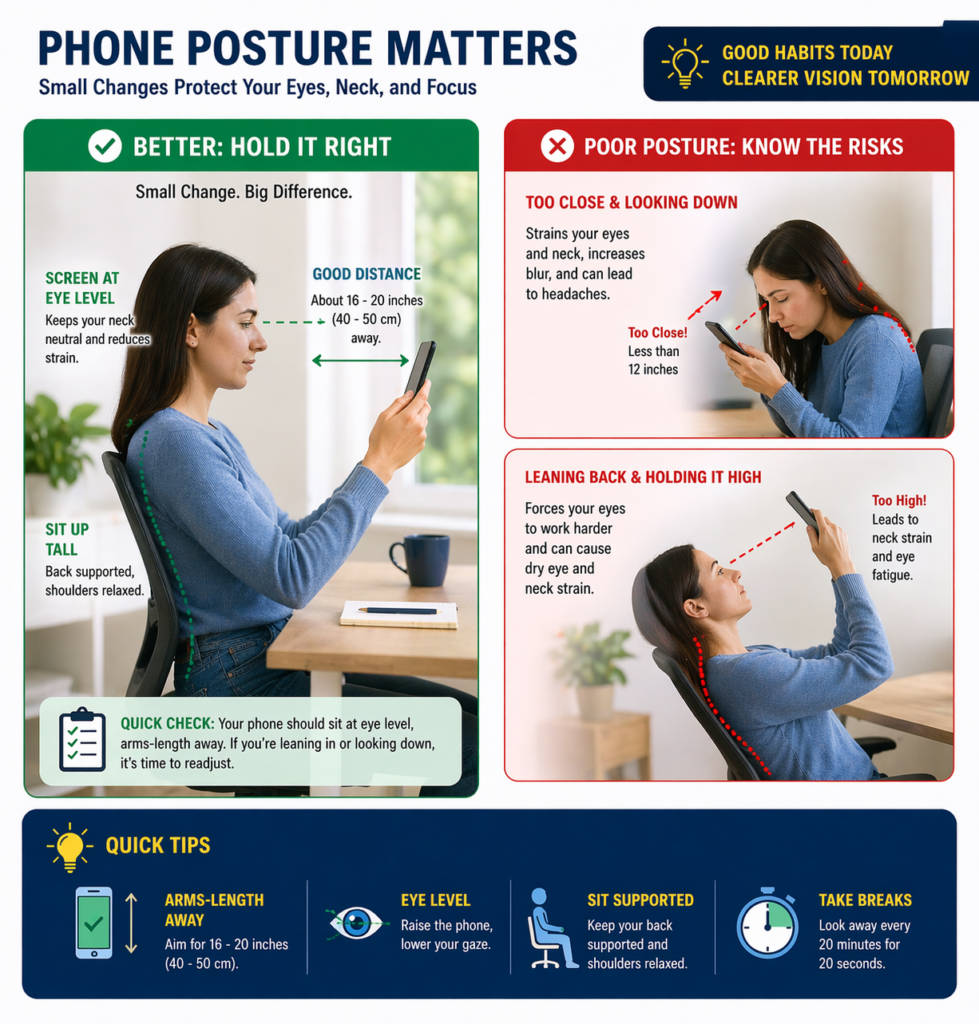
| Screen too close to face | Forces excessive convergence effort | Hold phone 16–20 inches away |
| Bright screen in a dark room | Pupil overload increases visual fatigue | Match screen brightness to room light |
| Scrolling in a moving vehicle | Double motion conflict (screen + vehicle) | Avoid screen use while travelling |
Could a Vision Problem Be the Real Cause?
For most people, the occasional nausea from scrolling is a nuisance, not a crisis. But when the symptom is frequent, appears quickly after minimal screen use, or is accompanied by headaches, blurred vision, or dizziness, it’s worth looking deeper.
Conditions like binocular vision dysfunction, convergence insufficiency, and visual midline shift syndrome are notoriously underdiagnosed. They don’t always show up on a standard eye chart test. Someone can have 20/20 visual acuity and still have a significant visual processing problem that makes screens unbearable.
Convergence insufficiency affects an estimated 5–8% of the population and is one of the most common causes of screen-related visual fatigue and nausea. Despite being prevalent, it is routinely missed in standard vision screenings that focus primarily on distance acuity rather than binocular function.
Poor visual alignment doesn’t just affect your eyes — it creates a whole-body strain. When your visual system is fighting to maintain a stable image while you scroll, your neck, shoulders, and even your posture compensate. This is part of why some people experience nausea alongside neck tension or headaches during screen use.
Step-by-Step: How to Reduce Scrolling Nausea Right Now
- Stop and stabilize. Put your phone down and fix your gaze on a stationary object at least 10 feet away. This resets the visual-vestibular conflict and gives your brain a chance to recalibrate.
- Regulate your breathing. Slow, controlled breaths reduce the autonomic nervous system’s response to the nausea trigger. Inhale for 4 counts, hold for 4, exhale for 6.
- Change your position. Sit upright with your feet flat on the floor. Lying down or slouching amplifies the vestibular mismatch and prolongs symptoms.
- Reduce screen contrast and brightness. Dim your screen and enable a warm color filter (Night Shift or similar) to reduce the visual strain load.
- Follow the 20-20-20 rule. Every 20 minutes, look at something 20 feet away for 20 seconds. This interrupts the visual stress cycle before symptoms build.
- Stay hydrated. Dehydration worsens vestibular sensitivity. Drink water before and during prolonged screen sessions.
- If symptoms persist, get a functional vision evaluation. Recurring nausea from scrolling is a clinical signal worth investigating, not just managing with workarounds.
What Common Mistakes Make Cybersickness Worse?
- Pushing through the nausea. Continuing to scroll when symptoms start reinforces the sensory conflict and extends recovery time significantly.
- Assuming it’s just anxiety. While anxiety can amplify symptoms, assuming that’s the whole cause often delays identification of an underlying visual issue.
- Using motion-reduction settings as a complete fix. Enabling “Reduce Motion” on your phone helps, but it won’t resolve symptoms rooted in a functional vision problem.
- Ignoring font and layout. Tiny fonts with tight line spacing demand more convergence effort. Increasing font size and line spacing reduces visual strain noticeably.
- Skipping sleep before heavy screen use. Visual fatigue accumulates. A tired visual system hits its tolerance threshold for screen motion much faster than a rested one.
- Ruling out vision therapy too quickly. Many people try prescription adjustments when what they actually need is an assessment of how their eyes work together, not just how sharp their vision is.
When Should You See a Vision Specialist?
Occasional screen-related queasiness is normal and manageable with simple adjustments. The threshold for professional evaluation shifts when symptoms are frequent, escalating, or accompanied by other signs of visual strain.
| Symptom Pattern | What It May Indicate | Recommended Next Step |
| Nausea within 5 minutes of scrolling | High visual-vestibular sensitivity or BVD | Functional vision evaluation |
| Headaches behind the eyes after screen use | Convergence insufficiency | Binocular vision assessment |
| Dizziness that lingers after putting phone down | Vestibular or visual midline dysfunction | Neuro-optometric assessment |
| Nausea affecting reading and computer use too | Systemic visual processing issue | Comprehensive vision therapy consult |
Vision therapy has demonstrated measurable success in treating convergence insufficiency and related binocular vision conditions, with some clinical trials reporting symptom improvement in over 70% of patients following a structured therapy program. This makes it one of the most evidence-supported interventions for screen-related visual discomfort.
Frequently Asked Questions
Why does scrolling on my phone make me feel sick?
Scrolling creates a sensory mismatch: your eyes detect motion on the screen while your inner ear registers that your body isn’t moving. Your brain interprets this conflict as a potential problem and triggers a nausea response. If you’re particularly sensitive to this, it could point to an underlying issue with how your visual system processes motion, such as binocular vision dysfunction or convergence insufficiency.
How to quickly get rid of cybersickness?
Put your phone down immediately and focus on a fixed, stable point in the distance. Sit upright, breathe slowly, and give your vestibular and visual systems a chance to recalibrate. Fresh air and gentle movement can accelerate recovery. Most mild episodes resolve within 10–20 minutes once the triggering stimulus is removed.
How long does digital vertigo last?
For most people, digital vertigo and associated nausea from scrolling dissipate within 15–30 minutes after stopping screen use. In cases involving underlying vestibular dysfunction or binocular vision issues, symptoms can linger for several hours. Chronic or recurring digital vertigo that persists beyond normal recovery windows warrants clinical evaluation rather than repeated self-management.
How to fix digital vertigo?
Short-term fixes include stopping screen use, looking at a stable distant object, and resting in an upright position. Long-term, the most effective approach is addressing the root cause. A functional vision assessment can determine whether your symptoms stem from a treatable condition like convergence insufficiency or a binocular coordination problem. Vision therapy, vestibular rehabilitation, or corrective lenses may be recommended depending on the findings.
How to reverse vertigo naturally?
Certain exercises can help recalibrate the vestibular system over time. The Epley maneuver is commonly used for positional vertigo. Gaze stabilization exercises, balance training, and structured vision therapy can all support recovery for screen-related vertigo. Reducing screen exposure, improving sleep quality, and staying well-hydrated support the process. For persistent vertigo, working with a vestibular therapist or neuro-optometrist delivers more reliable outcomes than home remedies alone.
Final Thoughts: Your Eyes Are Telling You Something
Nausea from scrolling isn’t just an inconvenience to push through. It’s your visual system signaling that something is off, whether that’s how you’re using your screen, the environment around you, or the way your eyes are processing motion at a deeper level.
The adjustments outlined here can make a real difference for mild, situational cases. But if you’re experiencing frequent cybersickness, quick-onset symptoms, or discomfort that spills into other screen activities, the conversation needs to move beyond tips and into clinical territory.
At Opto-Mization, our neuro-optometric assessments go well beyond standard eye tests. We evaluate how your visual system functions under real-world demands, including screen use, motion processing, and binocular coordination. If scrolling is making you sick on a regular basis, that’s worth understanding and treating properly.
Call Opto-Mization at +1 778-608-5982 to schedule a functional vision evaluation and find out whether a treatable visual issue is behind your symptoms.